Last Modified October 1, 2026
- Home
- Guides
- Activation API V1
- Alternative Implementations
There are many ways that software_DNA can be implemented using the
Activation API approach that
gives you flexibility on the sequence of events in the Activation process.
Below are some examples of implementations frequently used by software developpers.
Intro Screen with "Activate" button
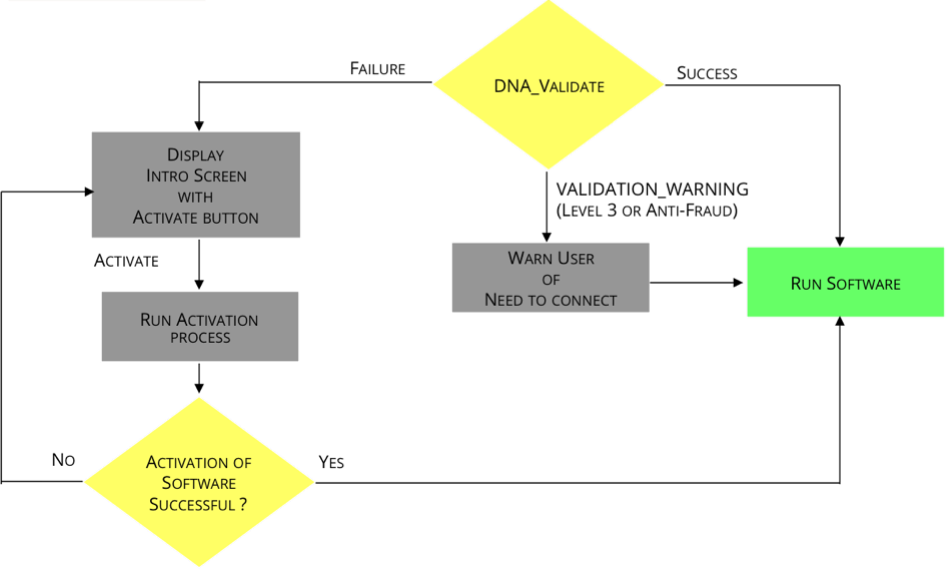
With this approach, if no License file exists or the WEB_Validate fails, then the User is presented with an "Intro Screen" from
the Application, instead of immediately seeing the Activation Screen.
You can design the "Intro Screen" as you want. For example, it could include:
- Welcome Message
- Instructions about the Activation Process
- Instructions on Evaluation Licenses
- buttons to Activate or Trial
Silent Evaluation on Initial Start-Up
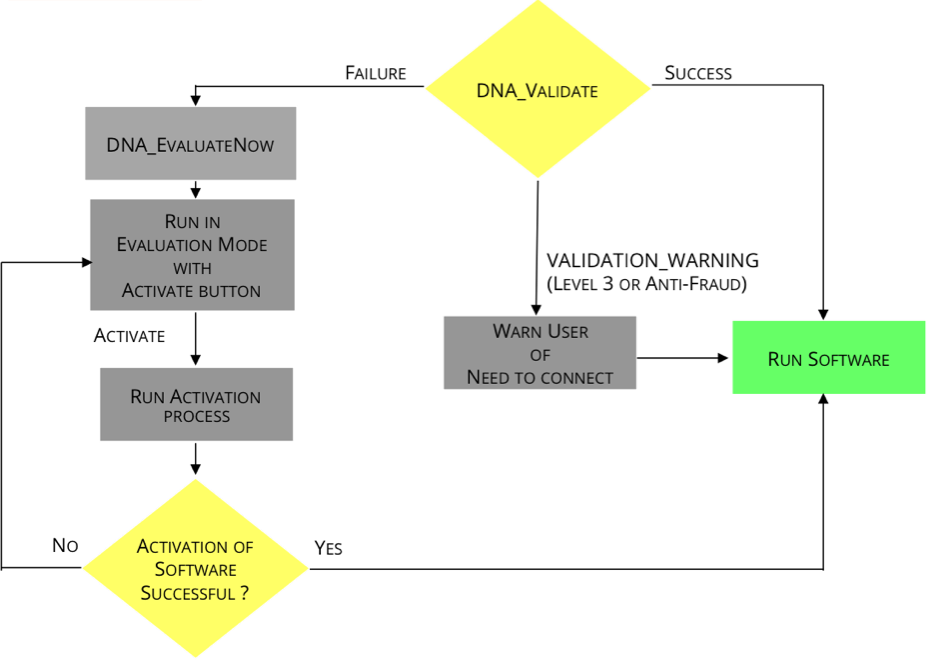
When the User starts the Application and if no License file exists or the WEB_Validate fails, you may want him to immediately start with an Evaluation License,
with the option of upgrading to a full license via a button or menu item. You can then present the User with an
"Intro Screen".
You can design the "Intro Screen" as you want. For example, it could include:
- Welcome Message
- Instructions about the Activation Process
- Details on his Evaluation License (ex: "There are 30 days left in your Evaluation").
- button to Activate for when the user is ready to activate with a purchased License Activation Code.