Last Modified October 2, 2026
- Home
- Guides
- Must Read Topics
- Adding to IDE project
- Adding to Eclipse
Adding software_DNA to Eclipse
(Windows / MacOS / LINUX)
-
Overview
To include software_DNA into your Eclipse Project:
in the ".src" folder of your Project, copy the DNA Library (shown below is for the MAC OS - libdna.dylib)
in the ".src" folder, create the sub-directories "com/softworkz/dna"
copy the DNAINT.java file into the "com/softworkz/dna" folder such that the path of the DNAINT file is
com/softworkz/dna/DNAINT.java
- Your project structure should look like the following:
in your application's main source file include in the import section:
import com.softworkz.dna.*;
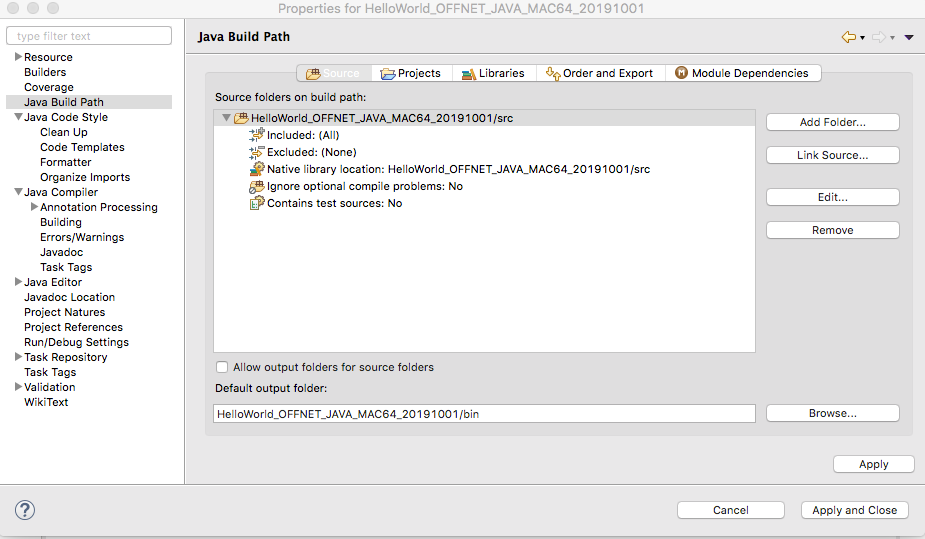
to ensure that the DNA library is in the JAVA Path you will need to:
- in Project Properties -> Java Build Path -> Source -> Native Library Locations
- specify "src" for the setting
your first API Call should be the DNASetCDMPathName() API to set the path for the CDM License file to a read-write
directory