Last Modified October 2, 2026
- Home
- Guides
- Must Read Topics
- Adding to IDE project
- Visual Studio
Adding software_DNA to VisualStudio
-
Overview
- Ensure the Target is correctly set (i386, x86_64, ARM64) for your targeted CPU.
- Copy the correct DNA Library and DNA_INT files to the root directory of your Project. Use the DNA_INT file appropriate for your
programming language.
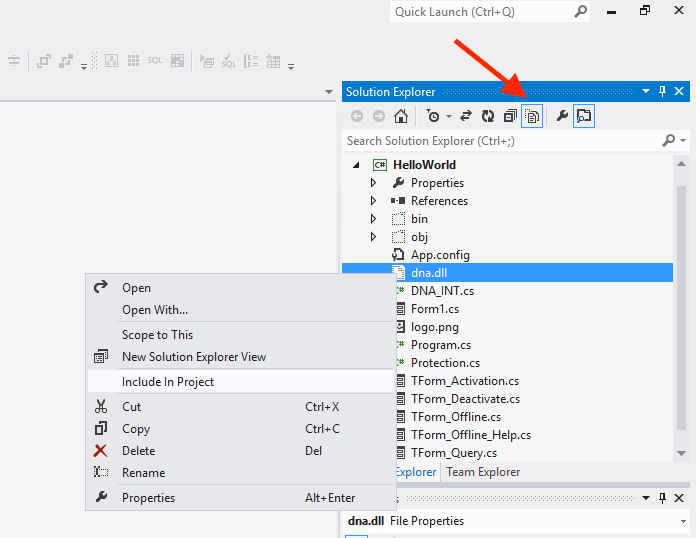
- From the "Solution Explorer" window :
- click on Show All Files to see these new files
- Right-click on each file and select Include in Project
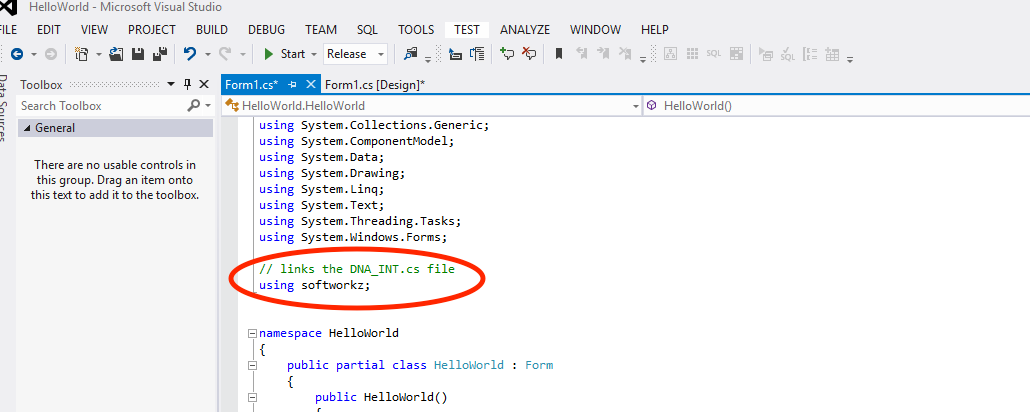
- in the source code files that will use the DNA API calls, add an
using softworkz or equivalent statement (C# shown here)
You should now be able to add DNA API calls in your project as per our Implementation Guides.